Case study · Delivery & Mobility

Food delivery and ride booking in one app — for Mondial

Mondial runs food delivery and ride booking in Doha. We built both sides of it as native apps on iOS and Android: the customer app people order and ride from, and the partner app the restaurants run their kitchen from.

Built for
Mondial customer app home screen, with an Order Food Online card above a Book Your Ride card, and Order Food and Ride Booking tabs.

At a glance

Two everyday errands that usually need two apps.

Getting food delivered and getting a ride are normally two installs and two sign-ups. Mondial puts both behind one account in Doha — and behind that sits a second app, for the restaurants on the other side of the order.

There is no separate food app and ride app, and no second registration. The home screen offers both, the tab bar switches between them, and the same account carries across either way.

Each app is built natively for its platform rather than wrapped once and shipped twice. The screens on this page are from the iOS build.

Client
Mondial
Sector
Food delivery & mobility
Market
Doha, Qatar
What we built
Two apps — customer and restaurant partner
Platforms
Native iOS and Android, both apps
Customer app
Food ordering, ride booking, live order tracking
Partner app
Order queue, menu & inventory, earnings
Sign-in
Mobile or email, Google, Apple
Currency
Qatari riyal

The customer app

From sign-in to the front door.

Four screens are the whole journey: getting in, choosing, the route, and then what was paid and why.
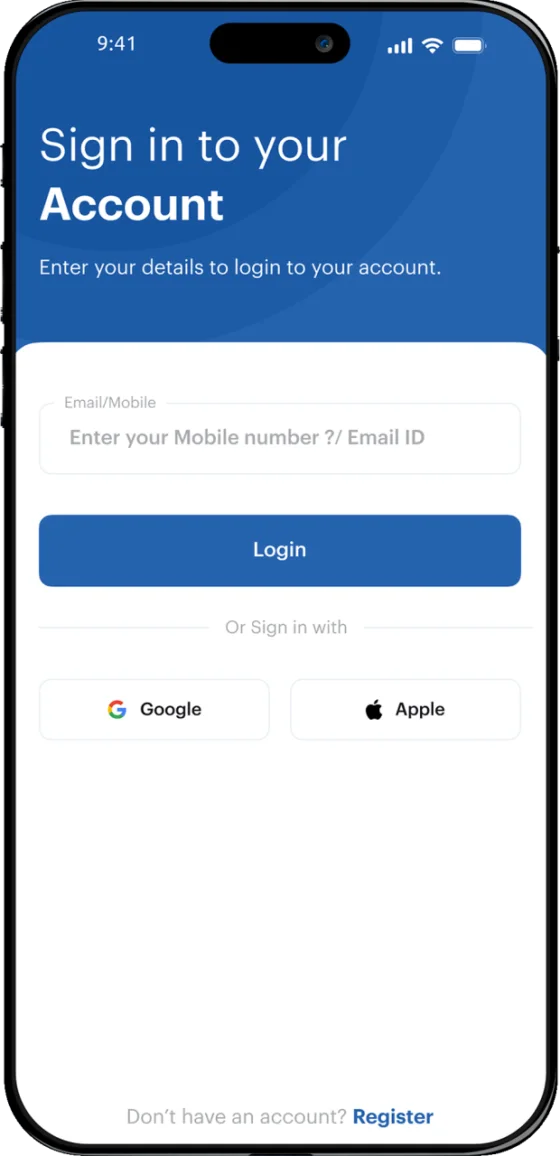
Mondial customer app sign-in screen, with a mobile or email field, a Login button, and Google and Apple sign-in options.
Sign in with a mobile number or an email address, or with an account the customer already has at Google or Apple — so a first order does not begin with inventing a password.
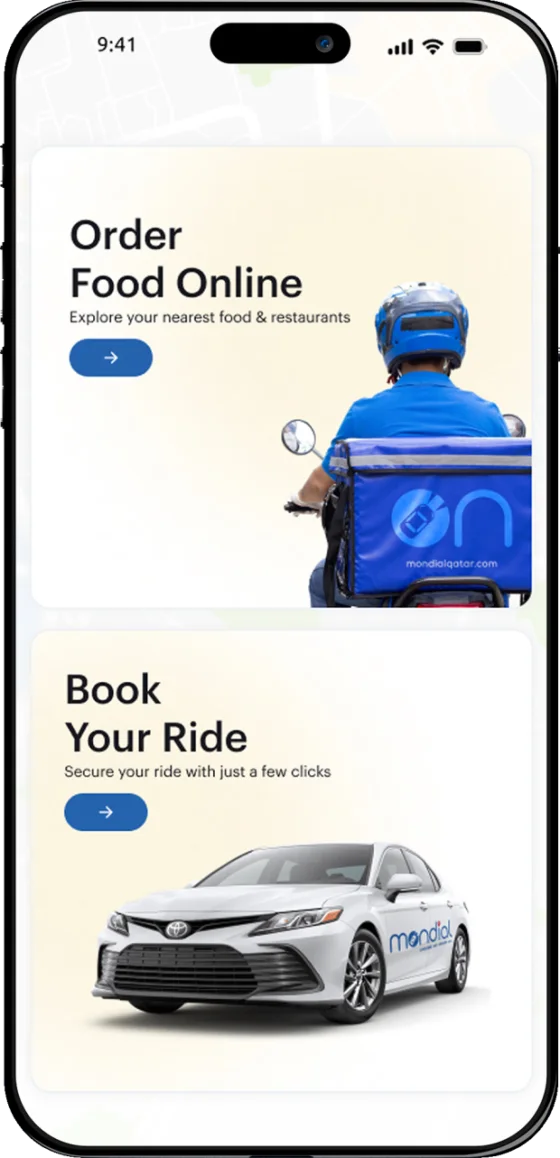
Mondial customer app home screen, with an Order Food Online card above a Book Your Ride card, and Order Food and Ride Booking tabs.
One home screen, two errands. Order Food Online and Book Your Ride sit side by side, and the tab bar switches between them without a second app or a second sign-in.
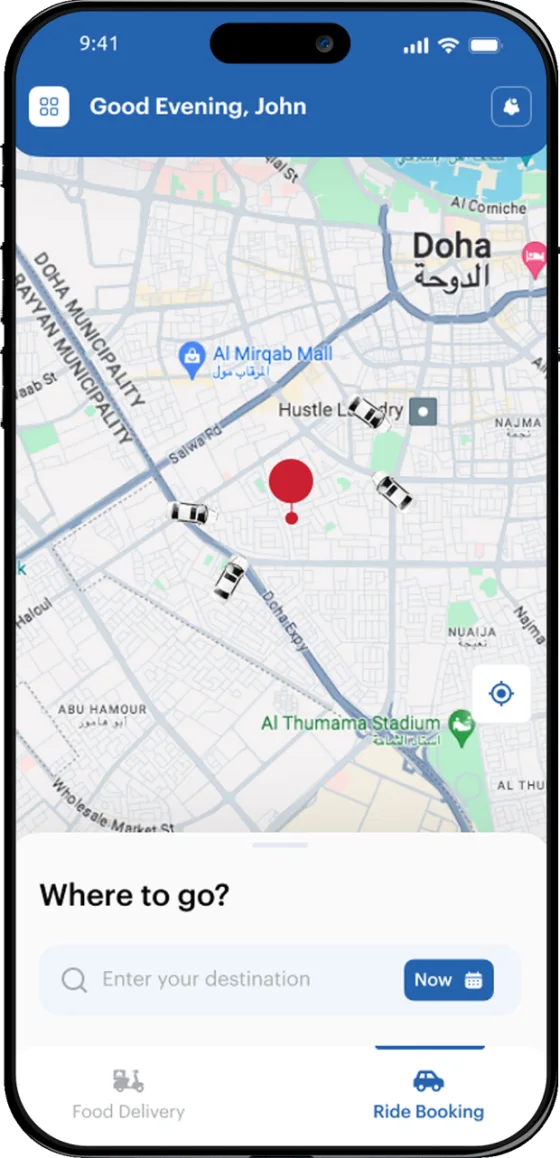
Ride booking in the Mondial customer app: a live map of Doha with nearby cars, and a Where to go? destination field.
Ride booking opens on a live map of Doha with the nearby cars already on it, and one field for the destination.
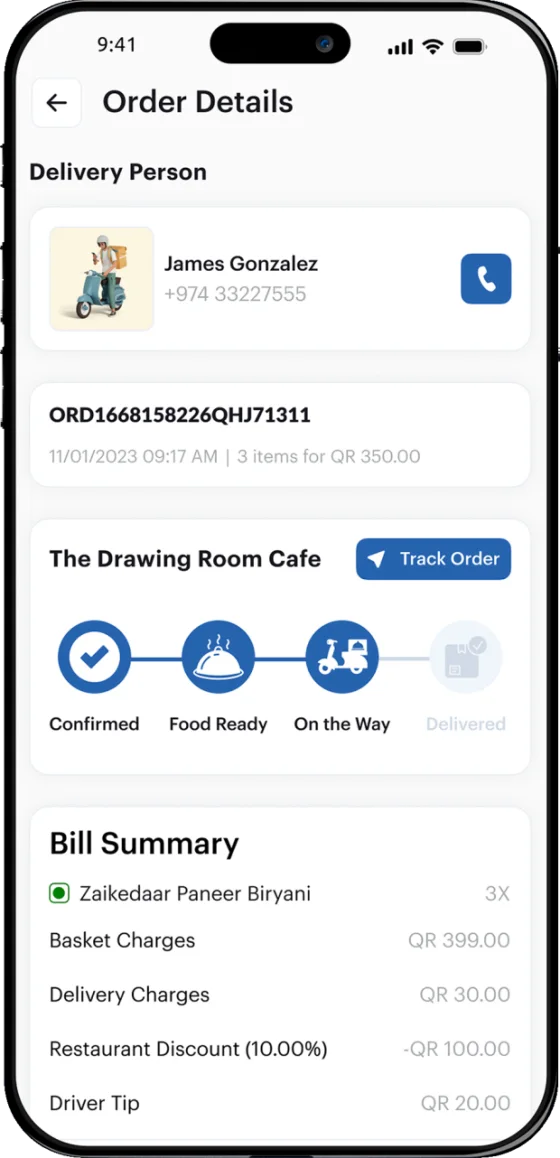
Order details in the Mondial customer app: the assigned delivery person and phone number, a progress track from Confirmed to Delivered, and an itemised bill in Qatari riyal.
A live order: the assigned driver and their number, the track from Confirmed through Food Ready and On the Way to Delivered, and a bill itemised down to the delivery charge, the restaurant discount and the driver tip.

The partner app

The other side of the same order.

The restaurant never sees the customer app. It sees the same order from its own end: accept it, cook it, and see what it earned.
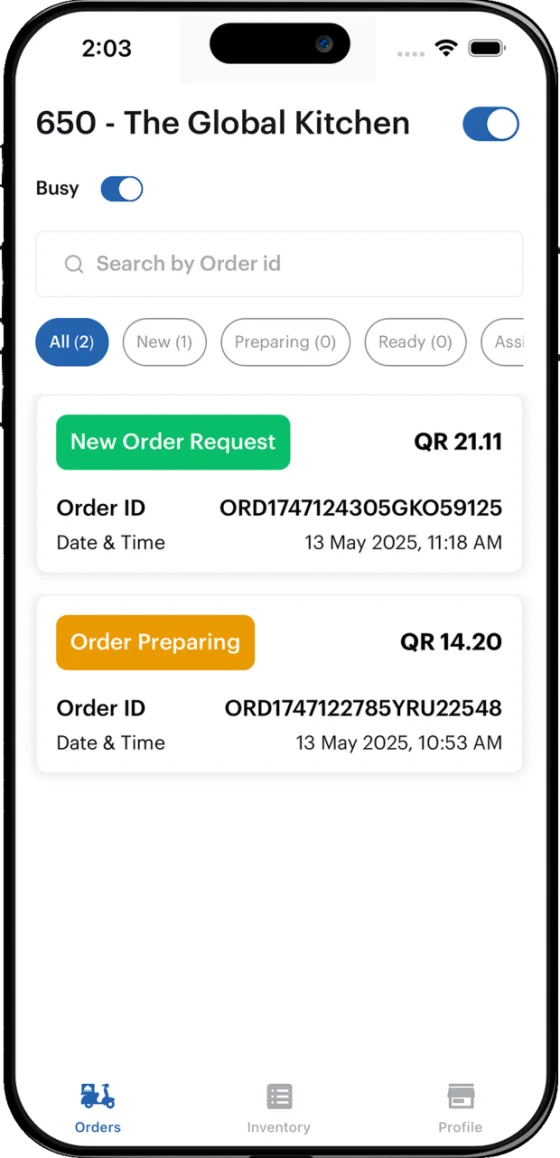
The order queue in the Mondial partner app, with store-open and Busy switches, New, Preparing and Ready filters, and two orders with their values in Qatari riyal.
The restaurant’s own screen. A store-open switch and a Busy switch at the top, orders filtered by New, Preparing and Ready, and every order carrying its value.
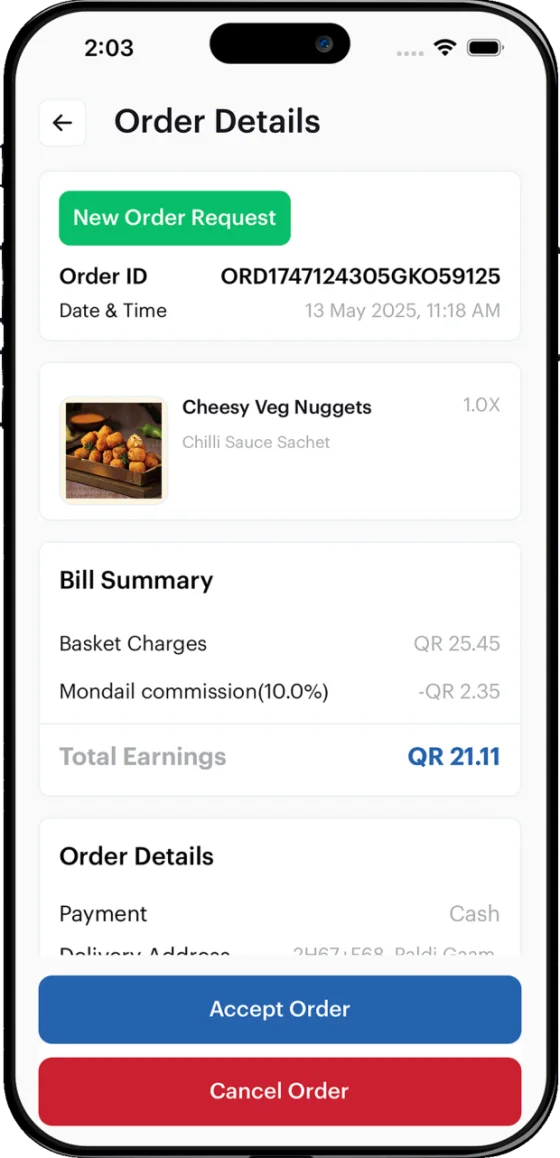
Order details in the Mondial partner app: the ordered item, a bill summary showing basket charges, platform commission and total earnings, and Accept Order and Cancel Order buttons.
Each order opens to the items, the basket charge, the platform commission and what the restaurant is actually left with — then Accept or Cancel.
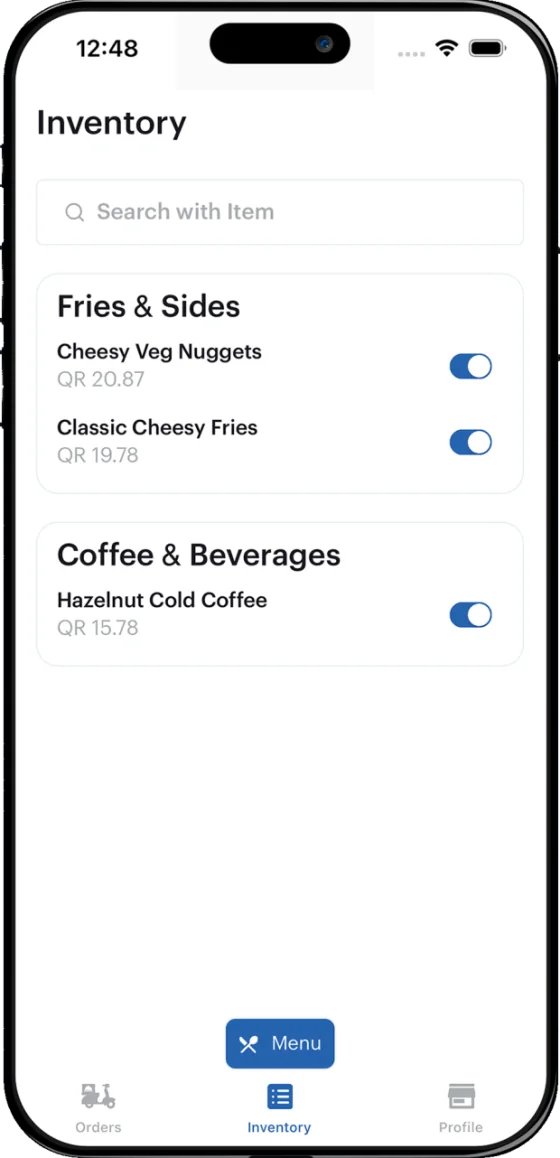
The inventory screen in the Mondial partner app, listing menu items under Fries & Sides and Coffee & Beverages, each with a price and an on/off switch.
Menu and stock in one place, every item on a switch — so a kitchen that has run out turns the item off instead of cancelling the orders that follow it.
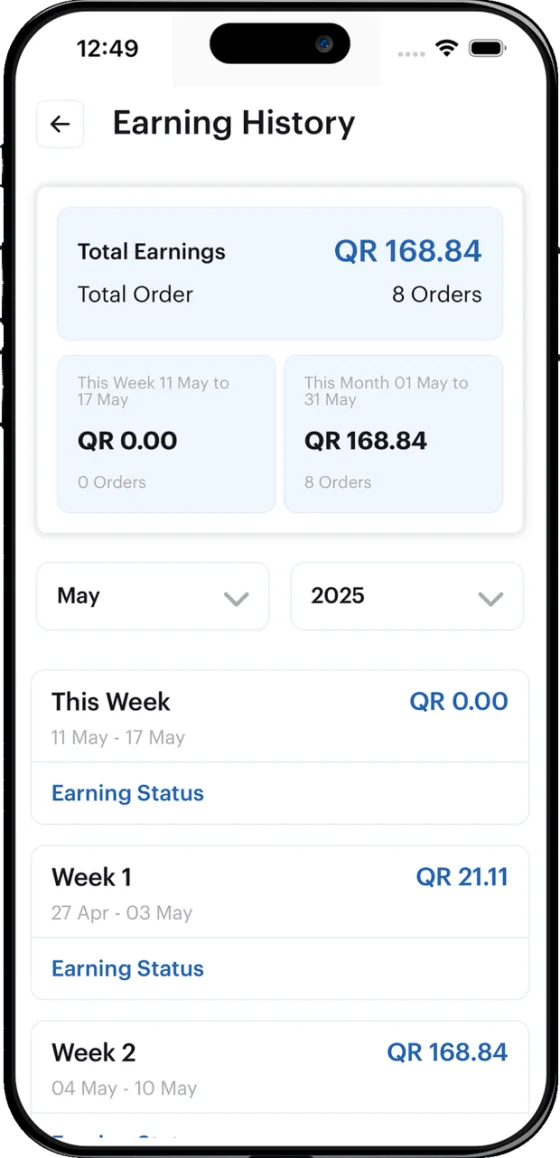
Earning history in the Mondial partner app, showing total earnings and order count, month and year selectors, and a week-by-week breakdown in Qatari riyal.
Earning history by week and by month, with the order count behind every figure.

One status, two sides

Four states, named the same way in both apps.

An order carries one status, and both apps use the same words for it. The customer watches the track fill in; the restaurant moves it along from its queue.

Confirmed
The restaurant has accepted the order, and the first step on the customer’s track lights up.
Food Ready
The kitchen has finished, and the order leaves Preparing in the restaurant’s queue.
On the Way
A driver is carrying it, and the customer has their name and number.
Delivered
The order closes, and its value lands in the restaurant’s earning history.

Building something with two sides?

Tell us who is on each side and what one transaction has to do from beginning to end. We will map it and tell you what it takes to build.